 Stripe integration
Build live Stripe dashboards for revenue, payments, invoices, and subscriptions
Connect Stripe to Chartbrew and turn payment intents, charges, customers, subscriptions, invoices, refunds, payouts, balance transactions, and compiled SaaS metrics into live dashboards for finance, product, support, and founder reporting.
What You Can Track
Stripe metrics that keep revenue reporting current
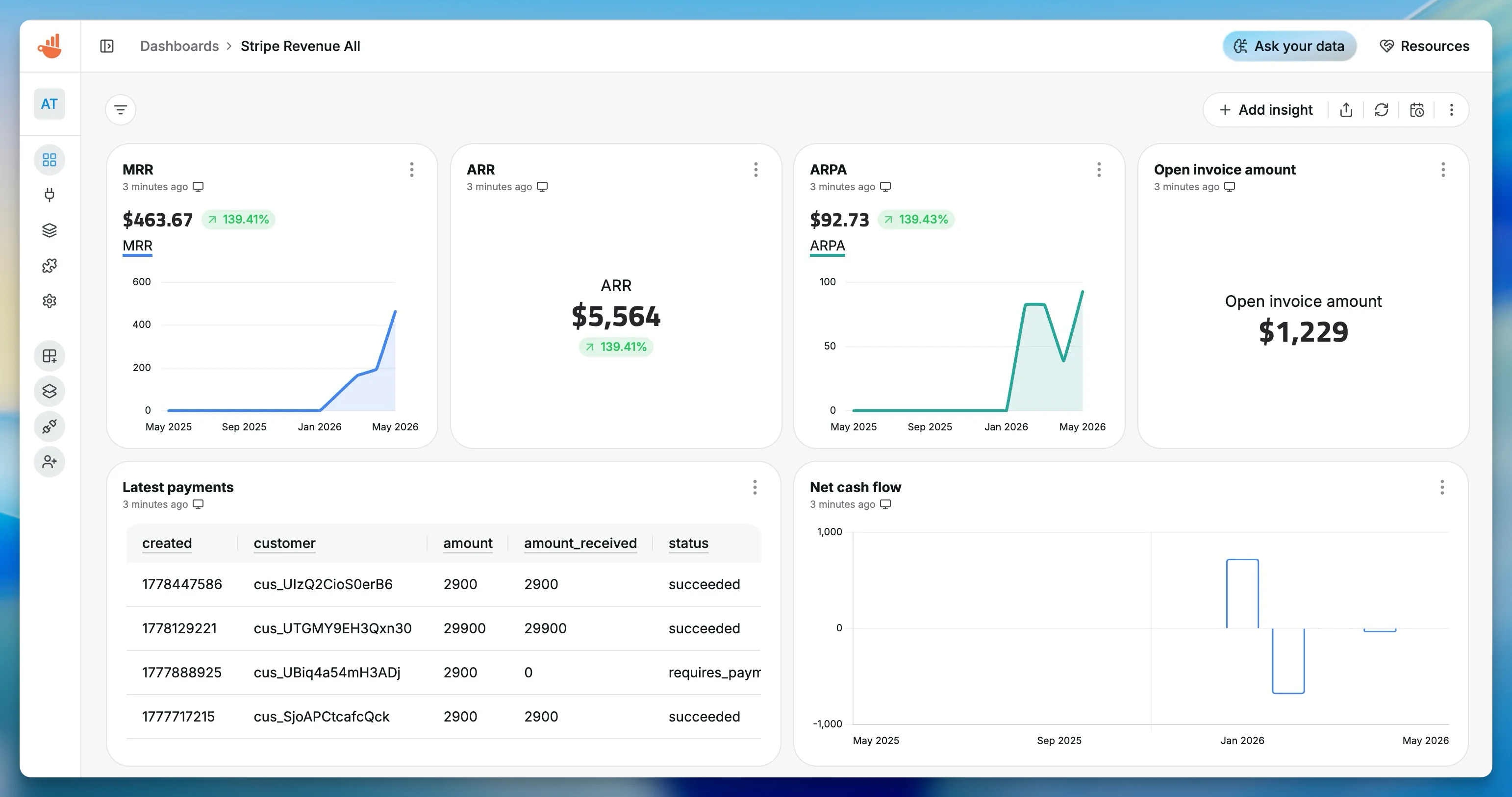
Build dashboards around payments, subscriptions, invoices, refunds, fees, cash flow, and recurring revenue so Stripe reporting does not live in a one-off export.
Net revenue
Track net Stripe balance transaction charges after fees across daily, weekly, or monthly reporting windows.
MRR and ARR
Use compiled Stripe subscription metrics for estimated MRR, ARR, ARPA, and recurring revenue trend charts.
Successful vs failed payments
Compare payment intents that succeeded with payments requiring a new payment method so payment operations can react quickly.
Refunds and fees
Monitor refunded amounts, gross revenue, Stripe fees, and net cash movement from balance transactions.
Open invoices
List open invoices, amount due, customers, due dates, and invoice status for finance follow-up dashboards.
Subscriber churn
Report on gross MRR churn, net MRR churn, subscriber churn, active subscribers, and estimated customer lifetime value.
Dashboard Templates
Start with real Stripe reporting templates
Use the templates available in the Chartbrew Stripe sources, then adjust resources, filters, chart types, formulas, and date ranges for your revenue workflow.
Stripe Starter Metrics
Net revenue, gross revenue, Stripe fees, refunds, successful and failed payments, active subscriptions, latest payments, and open invoices.
Stripe Compiled Metrics
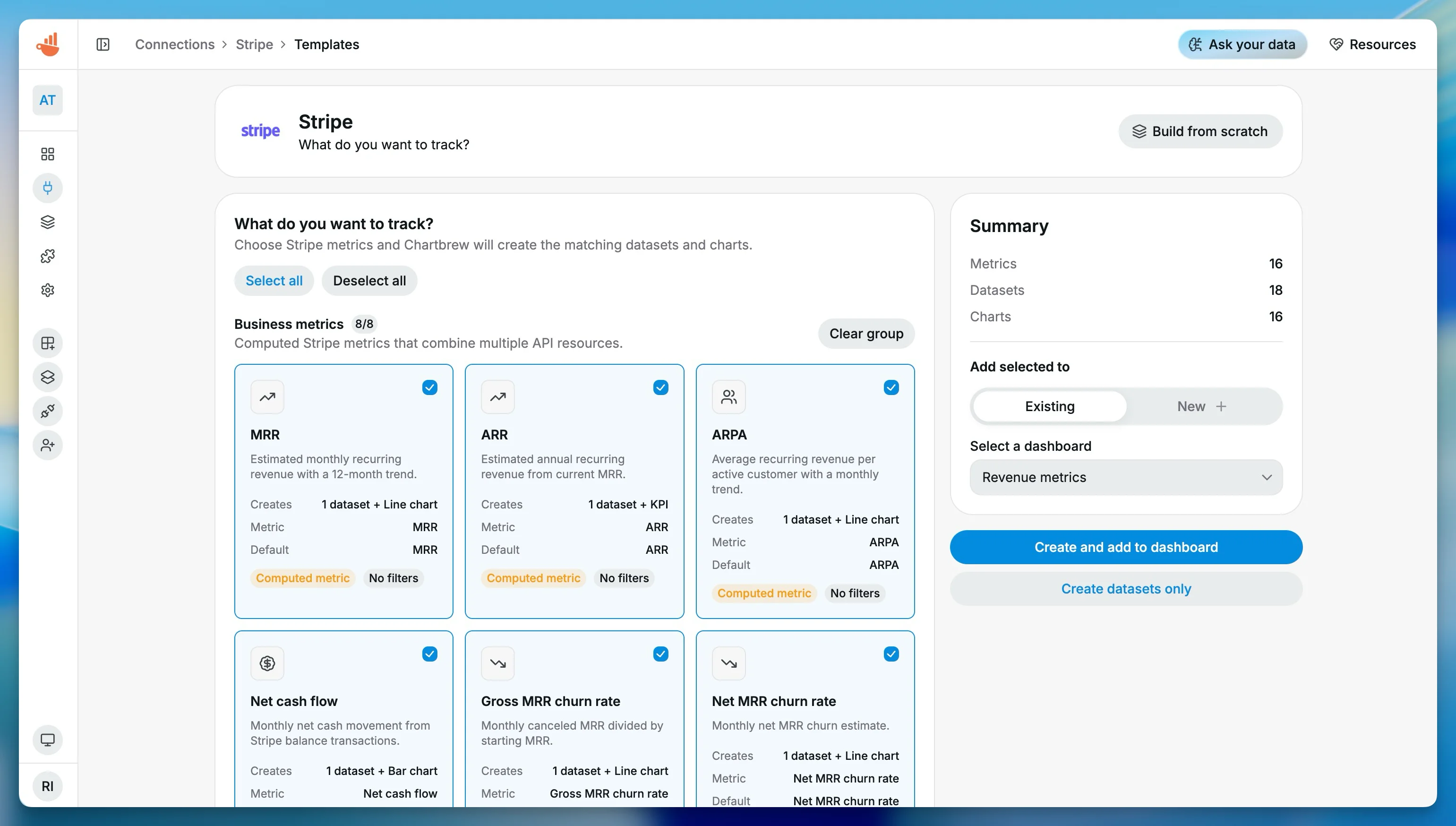
Subscription and cash-flow metrics for MRR, ARR, ARPA, churn rates, net cash flow, and estimated customer lifetime value.
Stripe Core Revenue - API
Legacy API starter charts for payment volume, payment status, paid invoices, new customers, subscriptions, net revenue, fees, and transactions.
How It Works
From Stripe API key to a live revenue dashboard
The Stripe workflow is built around a dedicated source, practical templates, and resource-aware dataset configuration.
Connect Stripe
Add a Stripe secret key or restricted read-only key, then test and save the connection in Chartbrew.
Choose resources or templates
Start from Stripe Starter Metrics, Compiled Metrics, or resources like payment intents, charges, customers, subscriptions, invoices, refunds, payouts, and balance transactions.
Build revenue datasets
Create aggregate, raw, or compiled-metric datasets for revenue, MRR, fees, refunds, open invoices, failed payments, and churn.
Share live reporting
Publish dashboards, embed charts, and schedule snapshots for founders, finance, product, support, and client reporting.
Why Chartbrew for Stripe
Built for Stripe dashboards that go beyond payment totals
Chartbrew gives Stripe data a reusable reporting layer with templates, compiled SaaS metrics, AI support, scheduled refreshes, sharing, and embeds.
Dedicated Stripe source
Chartbrew uses a Stripe-specific source with resource-aware configuration for payment intents, charges, balance transactions, customers, subscriptions, invoices, refunds, and payouts.
Compiled SaaS metrics
Use built-in compiled metrics for MRR, ARR, ARPA, churn rates, active subscribers, net cash flow, and estimated customer lifetime value.
Templates for fast starts
Start from Stripe Starter Metrics, Stripe Compiled Metrics, or Core Revenue API templates instead of building each payment chart by hand.
AI-assisted exploration
Ask Chartbrew AI for Stripe datasets and chart previews when you want answers about failed payments, MRR trends, refunds, churn, or open invoices.
Scheduled revenue reporting
Refresh Stripe dashboards and send snapshots on a schedule so payment and subscription reporting stays current.
Mix Stripe with other sources
Combine Stripe revenue with product activation, database metrics, marketing performance, support activity, or client reporting data.
Setup Requirements
What you need before connecting Stripe
The Stripe source uses a Stripe API key and can be refined with reporting window, currency, customer, status, product, price, and metadata context.
A Stripe account with access to the payment, billing, customer, and subscription data you want to report on
A Stripe secret key starting with sk_ or a restricted key starting with rk_
Read permissions for the Stripe objects used in your dashboard, such as payment intents, charges, invoices, subscriptions, refunds, payouts, and balance transactions
A target reporting window, such as last 30 days, last 90 days, or last 12 months
Optional currency, status, customer, product, price, or metadata context for filtered dashboards
| Dataset idea | What it can power |
|---|---|
| Net revenue | Net balance transaction charges grouped by day, week, or month |
| Gross revenue vs fees | Gross charge amount and Stripe fee trends for margin visibility |
| Successful vs failed payments | Payment intent counts split by succeeded and requires payment method statuses |
| Latest payments | Recent payment intents with customer, amount, status, method, and currency |
| Open invoices | Open invoice amount, due date, customer, invoice number, and hosted invoice URL |
| MRR and ARR | Compiled recurring revenue estimates from subscriptions, subscription items, prices, and invoices |
| Churn rates | Gross MRR churn, net MRR churn, and subscriber churn over monthly periods |
| Customer lifetime value | Estimated CLV from customers, paid invoices, subscriptions, and churn context |
Setup Guide
Follow the step-by-step Stripe connection guide
Create a Stripe secret or restricted key, connect it to Chartbrew, start from the starter metrics template, and explore revenue questions with Chartbrew AI.
Related Features
Features that make Stripe reporting useful
Combine Stripe dashboards with Chartbrew templates, AI workflows, sharing, automation, embeds, and filters.
Dashboard templates
Start Stripe reporting from prebuilt revenue, payment, invoice, subscription, and compiled metric templates.
Chartbrew AI
Ask for Stripe payment charts, MRR trends, open invoice tables, refund summaries, and churn breakdowns in plain language.
Data update schedules
Keep Stripe revenue, subscription, and invoice dashboards fresh without manually refreshing each chart.
Dashboard snapshots
Send recurring Stripe revenue snapshots to founders, finance teams, clients, or weekly operating reviews.
Embedded reports
Embed Stripe revenue dashboards, invoice follow-up views, or subscription health reports into internal tools and client portals.
Filter variables
Reuse Stripe dashboards across currencies, products, customer segments, statuses, and reporting periods.
Related Integrations
Connect Stripe with the rest of your reporting stack
Blend Stripe revenue metrics with product, customer, database, marketing, and operational data from other Chartbrew sources.
FAQ
Stripe integration questions
Practical details about using Stripe data in Chartbrew dashboards.
Build your Stripe dashboard
Turn Stripe activity into live revenue reporting without another export
Connect Stripe, start from a template, and share revenue, subscription, payment, invoice, refund, and cash-flow dashboards with the teams that need them.
