 Firestore integration
Build Firestore dashboards for collections, documents, users, and product activity
Connect Google Cloud Firestore to Chartbrew and turn collections, documents, nested fields, timestamps, statuses, users, events, and app data into live dashboards.
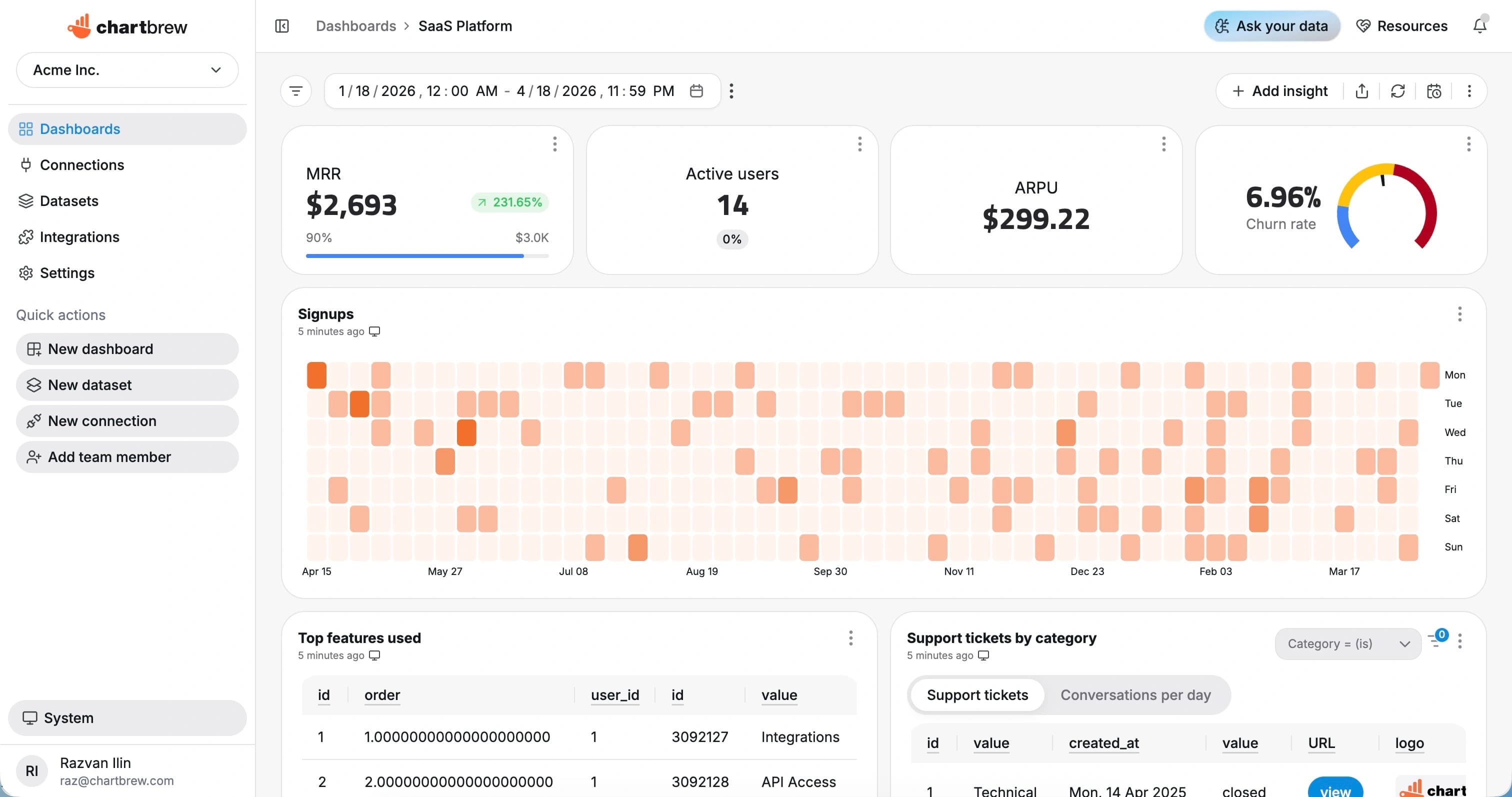
What You Can Track
Firestore metrics for app, product, and operational dashboards
Use Chartbrew to report on the collections and document fields already powering your Firebase or Google Cloud application.
Document counts
Track collection totals, active records, new documents, and grouped document counts.
User activity
Report on users, sessions, accounts, teams, and app activity stored in Firestore.
Status breakdowns
Group documents by workflow status, plan, role, type, or custom field.
Timestamp trends
Chart created, updated, completed, or event timestamps over time.
Nested fields
Use document fields and nested values to build charts, tables, and filters.
Operational tables
List recent records, failed jobs, pending items, or documents that need attention.
How It Works
From Firestore connection to live dashboard
The Firestore workflow is built around a source connection, reusable datasets, scheduled refreshes, and shareable dashboards.
Connect Firestore
Add a Google service account with access to the Firestore project and collections you want to report on.
Choose the reporting scope
Choose the collection, query scope, fields, filters, and date fields that should become a dashboard dataset.
Create datasets
Turn the response fields you need into KPI, chart, and table datasets with filters and date ranges.
Share live reporting
Publish dashboards, embed reports, or send scheduled snapshots so reporting stays repeatable.
Why Chartbrew for Firestore
A dashboard layer for Firestore application data
Chartbrew helps teams visualize Firestore collections without moving app data into spreadsheets or giving stakeholders console access.
Collection-aware reporting
Build dashboards from Firestore collections, documents, fields, and query scopes.
App metrics without exports
Use the same app data your product already writes to Firestore for dashboards and reports.
AI-assisted exploration
Use Chartbrew AI to plan Firestore dataset and chart ideas from your collection fields.
Scheduled refreshes
Refresh Firestore dashboards on a schedule so product and operations reports stay current.
Secure sharing
Share dashboards and snapshots without giving every viewer Firebase project access.
Cross-source context
Combine Firestore activity with Stripe, GA4, Customer.io, APIs, and SQL data.
Setup Requirements
What you need before connecting Firestore
Start with the right Firestore access, a clear reporting scope, and a few fields that map to useful dashboard metrics.
A Firebase or Google Cloud project with Firestore enabled
A service account with permission to read the reporting collections
The collection names and fields needed for the first dashboards
Timestamp, status, user, type, or numeric fields for useful charts
Optional filters for customer, app, workspace, region, or environment
| Dataset idea | What it can power |
|---|---|
| Documents by status | Documents grouped by status, state, type, or workflow field |
| New documents | Documents created by day, week, or month |
| Active users | Users or accounts with recent activity timestamps |
| Collection totals | Current counts for important collections |
| Pending records | Documents awaiting review, sync, completion, or approval |
| App events | Event documents grouped by name, user, or time period |
| Recent updates | Recently updated documents sorted by timestamp |
| Tenant view | Documents filtered by customer, project, workspace, or account |
Setup Guide
Follow the Firestore visualization guide
Use the walkthrough to connect Firestore with a service account, select collections, and build your first app dashboard.
Related Features
Features that make Firestore reporting useful
Use Firestore dashboards with Chartbrew automation, AI workflows, sharing, embeds, filters, and reporting tools.
Reporting API
Use Chartbrew alongside API-driven reporting workflows when teams need dashboards and programmable access.
Webhooks
Trigger reporting workflows and keep dashboards aligned with events from the rest of your stack.
Chartbrew AI
Turn API, product, marketing, and operational questions into chart and dataset ideas faster.
Data update schedules
Keep API dashboards refreshed on the cadence your reporting workflow needs.
Dashboard snapshots
Send recurring API dashboard snapshots to stakeholders without rebuilding weekly status reports.
Embedded reports
Publish API-powered charts inside client portals, internal tools, and shared reporting pages.
Related Integrations
Connect Firestore with the rest of your reporting stack
Blend Firestore metrics with product, customer, revenue, analytics, project, and operational data from other Chartbrew sources.
FAQ
Firestore integration questions
Practical details about using Firestore data in Chartbrew dashboards.
Build your Firestore dashboard
Turn Firestore collections into live app reporting
Connect Firestore, create reusable document datasets, and share dashboards for product, operations, and client reporting.
